
UniUni Tracking Number: Format, Examples & Where to Find It
A UniUni tracking number is a code used to identify and track a parcel as it moves through the delivery network. It lets you check shipment updates, recent tracking events, and delivery progress.
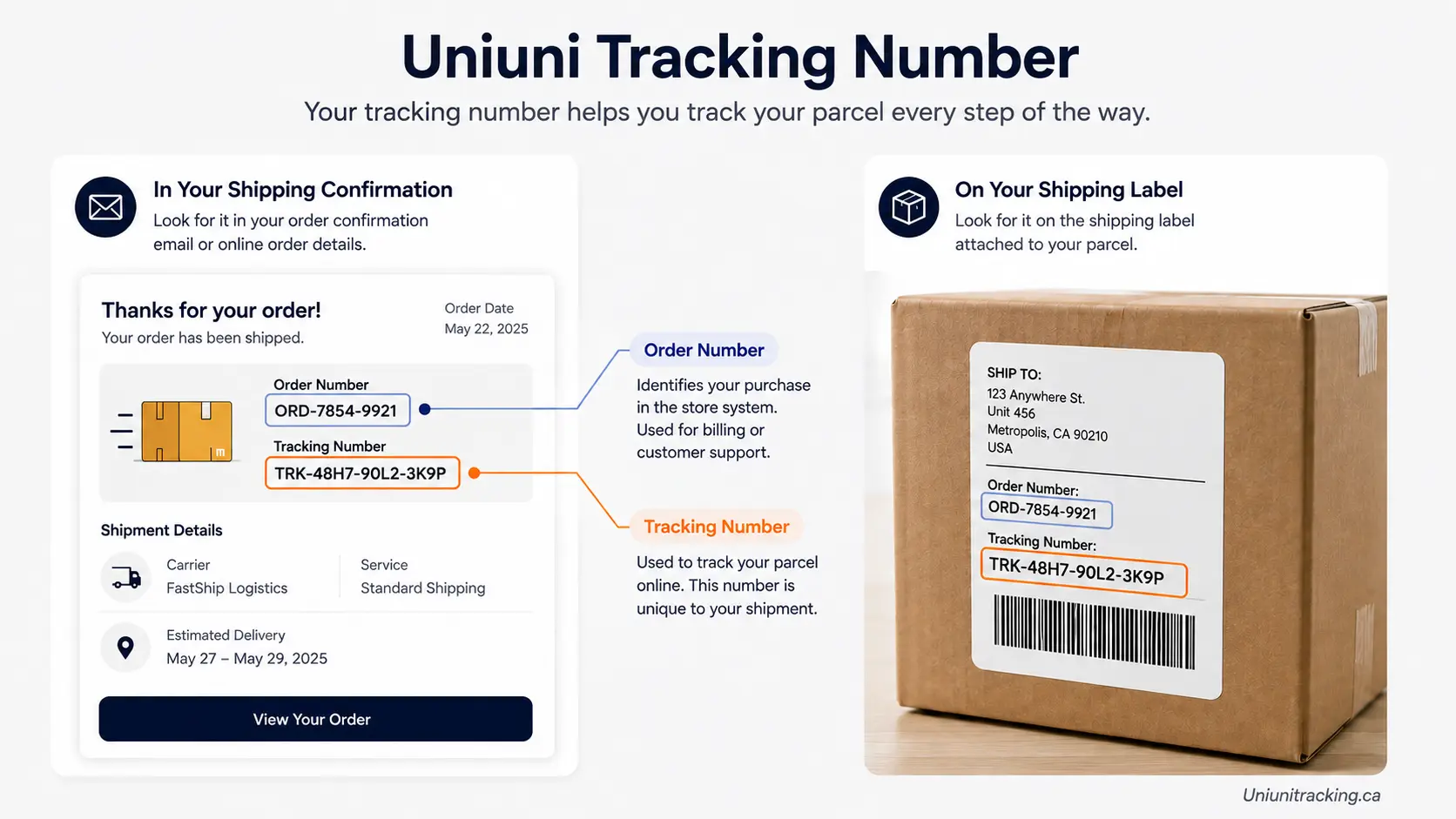
Your tracking number is usually provided by the seller or marketplace after an order is shipped. It may appear in your shipping confirmation email, order details, SMS notification, or seller message.
What Is a UniUni Tracking Number?
A UniUni tracking number is a code tied to one specific parcel inside UniUni’s last-mile delivery network. Entering it into a tracking tool shows scan events, delivery status, and (once available) an estimated delivery date.
It’s different from an order number, which belongs to the retailer’s system, not UniUni’s. The two often get confused because sellers sometimes display them close together on the same confirmation page.
| Identifier | Purpose | Usually provided by | Tracks the UniUni shipment? |
|---|---|---|---|
| UniUni tracking number | Identifies and tracks the shipment | UniUni, once the shipment is created or received | Yes |
| Order number | Identifies your purchase | The store or marketplace | No |
| Merchant reference | Internal reference for an order or shipment | The store or marketplace | Usually no |
| Origin-carrier tracking number | May identify the shipment with another carrier | The origin carrier or freight forwarder | Sometimes, once linked to a UniUni record |
Where Can I Find My UniUni Tracking Number?
You can usually find your UniUni tracking number in the shipping or order information provided after your purchase. Common places include:
- The shipping confirmation email sent after your order ships
- Your order details or “order history” page on the marketplace
- An SMS or app notification from the seller
- A direct message from the seller, if you bought through a marketplace chat
- The “shipping” or “tracking” tab inside your account on the retailer’s site
If you see several numbers on your order page, look for a label such as Tracking Number, Tracking ID, or Shipment ID rather than the order number.
Where exactly it appears depends on the seller, not UniUni. Some marketplaces — Temu, SHEIN, AliExpress, YesStyle, eBay, and TikTok Shop among them — route some of their shipments through UniUni for the final delivery leg. That doesn’t mean every order from those platforms uses UniUni; it depends on the specific seller, route, and destination.
If you can’t find it, check your spam folder for the shipping confirmation, or look at the order page again a day or two after the seller marks the order as shipped.
What Does a UniUni Tracking Number Look Like?
Formats vary, and UniUni has not published one single, official specification that covers every number it can look up. Third-party tracking sites disagree with each other on the exact digit count, which is a sign that no one format applies universally.
Here’s what’s commonly reported, labeled clearly as observed patterns rather than a confirmed rule:
| Commonly reported pattern | Where it’s typically mentioned | Confidence |
|---|---|---|
| Starts with “UUS,” followed by numbers | Cross-border shipments with a US-linked leg | Most frequently reported |
| Starts with “UNIA,” followed by numbers | International-origin packages entering UniUni’s network | Reported by several third-party sites |
| Mostly or entirely numeric, no letter prefix | Some UniUni-generated domestic labels | Reported less consistently |
An illustrative, made-up example (not a real shipment): UUS0000000000123
Because there’s no single confirmed format, the safest approach is to use the exact number your seller gave you — letters, digits, and all — rather than checking it against a prefix list. If it doesn’t return a result, that’s a reason to verify the number, not necessarily a sign it’s fake.
UniUni Tracking Number Formats and Prefixes
You may see other prefixes mentioned online, including UUSC or JY. Treat these the same way: as things some shipments show, not as an official, universal rule.
Different prefixes likely reflect different origin systems, partner carriers, or which platform generated the shipping label — not different levels of legitimacy. A number that doesn’t match a prefix you’ve seen elsewhere can still be a valid, trackable UniUni number.
If UniUni’s own tracking system doesn’t recognize a number at all, that points to a data-entry issue or a shipment that hasn’t been handed to UniUni yet — not to a format problem.
Tracking Number vs Order Number
These two get mixed up constantly, so here’s the short version:
| Tracking number | Order number | |
|---|---|---|
| Identifies | The physical shipment | Your purchase |
| Issued by | UniUni or a linked carrier | The retailer or marketplace |
| Used to check | Delivery status, location, scan history | Order status, refunds, returns |
| Works in UniUni’s tracking tool? | Yes | No |
If you paste a number into the tracking tool and get no result, double-check you didn’t grab the order number by mistake. Order numbers are often shorter, and they usually sit right next to the “reorder” or “return item” buttons on a marketplace order page.
How to Use Your UniUni Tracking Number
- Find the correct number from your shipping confirmation, not your order confirmation.
- Copy it exactly, including any letters. Don’t add spaces or the words “tracking number.”
- Enter it into the tracking tool on [Internal link: UniUni Tracking homepage].
- Review the latest scan event and status shown.
- If nothing shows up yet, check again later — the number may not have entered UniUni’s system.
UniUni Tracking Number Not Working?
A few things usually explain this. Work through them in order:
- Wrong number entered. The order number was pasted instead of the tracking number.
- Extra characters. Spaces, dashes, or the words “tracking number” got copied along with the code.
- Label created, parcel not yet received. The seller generated a shipping label, but UniUni hasn’t physically received the parcel yet.
- Recent handoff. The parcel was just given to UniUni and hasn’t been scanned into the system yet.
- Partner-carrier stage. An international shipment is still with an origin carrier and hasn’t reached UniUni’s part of the journey.
- System delay. Scan data can take time to appear, especially during high-volume periods.
According to UniUni’s own tracking page, if there are no updates on a tracking number, the order is most likely still being processed by the merchant. An estimated delivery date appears once UniUni physically receives the parcel — not before.
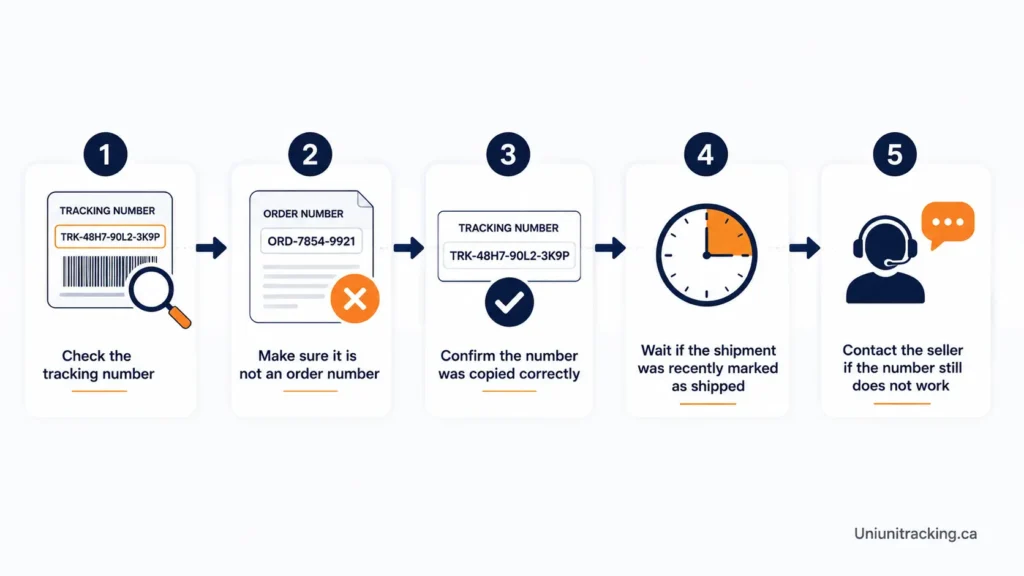
- Re-copy the number from the original shipping email, character by character.
- Confirm it’s the tracking number, not the order number.
- Give the shipment some time to enter the carrier’s tracking system, especially if the seller only recently marked it as shipped.
- Try the number again after a day.
- If it still doesn’t work, contact the seller to confirm the parcel was actually handed to UniUni.
Can I Track a UniUni Package Without a Tracking Number?
Not directly. UniUni’s public tracking tool requires a tracking number, and there’s no separate lookup by name, address, or order number.
If you don’t have one, the next step is your seller, not UniUni. Ask them to confirm the carrier and resend the tracking number from your order.
What If I Have a Different Tracking Number?
International shipments often start under a different carrier’s tracking number before UniUni takes over for the final delivery leg. That earlier number belongs to the origin carrier or freight forwarder handling the first part of the journey.
Once the parcel reaches UniUni, it may be tracked under a separate UniUni number — and the number your marketplace shows you isn’t always the one UniUni’s own system recognizes. If your first number stops updating partway through, check your order page for a second tracking number before assuming something went wrong.
When Does a UniUni Tracking Number Start Showing Updates?
There’s a difference between a shipping label being created and the parcel actually being scanned. A number can exist — and even be enterable into a tracking tool — before UniUni has touched the package.
Meaningful updates, including an estimated delivery date, typically appear only after UniUni physically receives and scans the parcel. Give the shipment some time to enter the carrier’s tracking system, particularly if the seller has only just marked the order as shipped — UniUni doesn’t publish a guaranteed activation window, so treat any specific “wait exactly X hours” claim you see elsewhere with caution.
Common Questions About UniUni Tracking Numbers
Where can I find my UniUni tracking number?
In the shipping confirmation email, your marketplace order page, or an SMS/app notification from the seller — not from UniUni itself.
What does a UniUni tracking number look like?
Formats vary. Many reported examples start with letters like “UUS” or “UNIA” followed by digits, but UniUni hasn’t published one official format that covers every number.
Why is my UniUni tracking number not found?
Usually because the wrong number was entered, the parcel hasn’t reached UniUni yet, or the label was only just created.
Can I track UniUni with an order number?
No. Order numbers belong to the retailer’s system and aren’t recognized by UniUni’s tracking tool.
Does every UniUni tracking number start with UUS?
No. UUS is a commonly reported prefix, not a confirmed universal rule. Other prefixes and formats exist.
Can I track a UniUni package without the tracking number?
Not through UniUni’s public tool. Contact the seller for the correct number.
Why has my tracking number not updated?
Most often because UniUni hasn’t physically received the parcel yet. Updates typically begin after the first scan.
Can a UniUni tracking number change during shipping?
An international shipment can start under an origin carrier’s number before a separate UniUni number takes over for the last-mile leg.
Where can I find my tracking number on an online order?
Check the shipping confirmation email first, then the order details page on the marketplace or store account.
What should I do if the seller gave me the wrong tracking number?
Contact the seller directly and ask them to confirm the correct number and carrier for your shipment.